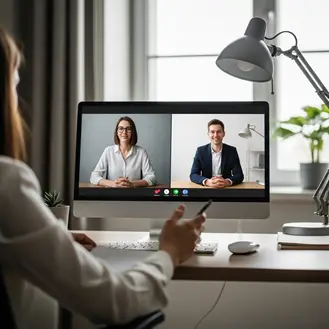
The norm for hiring is virtual interviews. You can still do well in the interview and leave a favorable impression if you prepare.
Here are some useful tips on how to perform effectively during the virtual interview.
Technology Testing
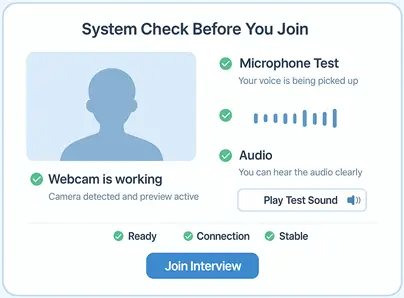
Before the interview starts, ensure that everything is functioning properly. Technical difficulties will disrupt the flow, potentially overshadowing your qualifications and confidence. Join 5 minutes before the start of the interview to verify the following:
- The software or platform that will be used for the interview.
- Webcam, microphone, and audio settings (input and output).
- The device’s charge status (ensure the computer is plugged in or has a high battery).
- Charge for the device (make sure the computer is plugged in or has a high battery)
Platforms such as Google Meet, Zoom, and Microsoft Teams provide testing features; use them. Know how to share your screen and open a document in case you’re asked to present.
Set the Stage
Just Before You Go
Empower individuals to overcome barriers, gain essential skills, and secure gainful employment through our proven programs—KeelMaster, KeelWings, and KeelMate. Your support can spark change and build brighter futures.
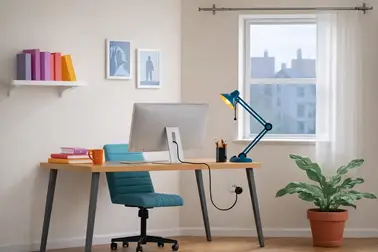
Donate NowJust like the background, lighting, and camera angle matter when shooting, they are equally important during a virtual interview. Make sure you and your surroundings look appealing by testing your setup.
- A room with a neutral wall or little to no decor is best for making a professional impression.
- If you are uncomfortable with your background, use a simple professional background filter (like workplace/office/minimalistic decor).
- Make sure you are positioned on the screen such that your face and shoulders are visible.
- Looking into the camera makes it easier to make virtual eye contact.
- A quiet spot with less disturbance from people, pets, or vehicles is best.
Dressing Professionally from Head to Toe
Even if the interviewer can’t see you, dress like you would for an in-person interview. To be sure you look your best, check the mirror before you start the interview.
- Pick colors that are solid.
- Dress for the job.
- Dress comfortably and professionally (confidently).
Nailing Nonverbal Communication
Nonverbal communication is when you use facial expressions, tone, gestures, and body language to say something without using words. And this is just as important for a virtual interview. Doing the following will help you appear engaged and professional:
- Try to keep your shoulders relaxed and your posture straight.
- Show that you’re interested by nodding and smiling.
Prepare and Practice
Practicing clear responses and avoiding rambling is a crucial step. Virtual interviews can feel faster and less daunting than a face-to-face interview, but many find the opposite to be true.
- To assess tone, pace, and filler words, record yourself answering frequently asked questions.
- Use the STAR method for behavioral questions: Situation, Task, Action, and .
- Be succinct. Keep your responses to one or two minutes, unless further information is requested.
- Anticipate and practice common questions like “Tell me about yourself” (in about 30-60 seconds) and “Tell me about a time…”
- Remain calm, and do not get offended.
- Use AI-powered tools to practice responses and improve your virtual interview performance.
- You might be tempted to rely on notes, but if you’ve practiced enough, you won’t need them, and they rarely add value.
The more you practice, the more confident and articulate you’ll be. This will make you look more natural, relaxed, and polished during virtual interviews.
- Video call a buddy or mentor to practice.
- For further practice, use mock interview sites.
- Reach out to Thomas Garrod from KeelWorks to set up mock interviews.
Ask Thoughtful Questions
Asking good questions shows the interviewer that you are prepared and genuinely interested in the role. Write down three to five questions and choose the ones that are most pertinent. AI software can help you develop a list of questions that are important.
Follow-up After the Interview
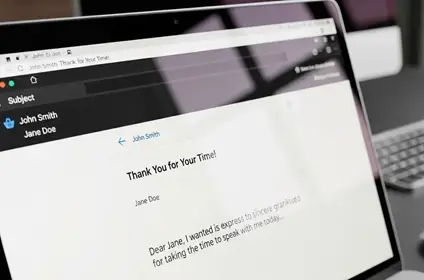
A quick thank-you note makes you look more professional (brings you back on their mind and provides you an opportunity to add value) and makes a stronger impression. You should send a thank-you email within 24 hours.
- To indicate that you were paying attention, include a short overview of what you liked talking about.
- Reiterate your interest and explain why you are a good fit.
- Add something not listed on your resume, such as context behind an achievement or a unique experience.
About keelworks
KeelWorks is a nonprofit dedicated to equipping individuals with the skills, confidence, and support needed for sustainable employment and personal growth. Through structured training and mentoring, we support careers. Our three programs—KeelWings for recent graduates, KeelMate for reentering or transitioning professionals, and KeelMaster, a four-phase initiative addressing converting the underachieving to leaders—prepares individuals for long-term career success.
FAQs
- Should I wear headphones or earbuds for a virtual interview?
Only use them when your computer microphone isn’t effective.
- Is it okay to look at my resume during the interview?
Ensure the interviewer has the latest version by sharing it yourself or through the recruiter; with enough practice, you won’t need it.
- What if there is more than one interviewer?
Look at the camera while you answer, but also acknowledge each interviewer as you answer.
Just Before You Go
Empower individuals to overcome barriers, gain essential skills, and secure gainful employment through our proven programs—KeelMaster, KeelWings, and KeelMate. Your support can spark change and build brighter futures.
Donate Now